

Follow the steps
Look for the Away group
A pupil who went offline with work on their board is not lost. Their tile folds into a small Away group that says “offline, their work is kept”.
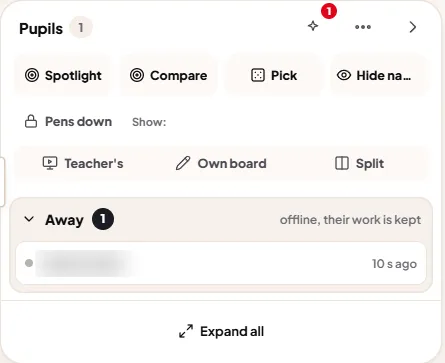
Know what happened to an empty tile
If a pupil joined, never wrote anything and went offline, their tile leaves your list after 2 minutes.
Wait for them to come back
When the pupil rejoins, they reclaim their own board on any device and nothing is lost. See pupil name and PIN login.
Press Tidy up if you see doubles
If a pupil typed their name a little differently, they may have two tiles. Choose Tidy up in the Pupils panel menu. It appears when there is something to tidy. It clears empty offline tiles and offers to merge tiles that belong to the same child.
Undo if you change your mind
Tidy up archives, never deletes, and you can undo it.
Good to know
- Ask pupils to type their name the same way every time.
- Use Tidy up at the end of a lesson, not the middle, to keep your grid calm.
- If the whole class went quiet, check your own connection first: what happens when the Wi-Fi drops.
- A pupil who joins from home can rejoin in the same way.
Common questions
Has the pupil’s work been lost?
No. If they wrote anything, it is kept and their tile moves to the Away group.
Why did an empty tile vanish?
Pupils who join, write nothing and go offline are cleared from your list after 2 minutes.
What does Tidy up do?
It clears empty offline tiles and offers to merge tiles that belong to the same child. It never deletes anything, and you can undo it.
A pupil joined on a new device. Is that a new pupil?
No. They reclaim their own board, and the old device is told and stops. If they cannot get in, see a pupil cannot join.
Related guides
 A pupil cannot join: what to checkTroubleshooting
 What happens when the Wi-Fi drops?Troubleshooting
 Why can my pupils not see a page?TroubleshootingHow to get started with JotoroGetting started
Cannot find an answer?
Tell us what was missing and we will improve this guide.
Suggest an improvement