
A Whiteboard.chat alternative with a live tracker, assessments and records.
Both give every pupil their own board, and both can mark answers. Jotoro shows you who is right as they write, and keeps a record of every lesson.
Checked on 15 October 2026
- The same idea: a board for every pupil, with the teacher able to step onto any of them and mark answers.
- Jotoro has: a live question tracker, timed assessments, records, replays and homework with the lesson’s videos attached.
- Whiteboard.chat has: a free plan, co-teachers, built-in video calls, and pupils who join with a link today.
In short
Jotoro is an alternative to Whiteboard.chat for teachers who want every pupil’s board plus a live view of who is right, assessments and a record of each lesson. Whiteboard.chat is an established browser whiteboard with a free plan, co-teachers and video; Jotoro adds a live question tracker, timed assessments with per-question analysis, records and replays. Everything about Whiteboard.chat below was checked on its own pages on 15 October 2026.
- The same idea: a board for every pupil, and answers that can be marked
- Jotoro tracks and records; Whiteboard.chat has a free plan, co-teachers and video
- Dated facts, with sources, and what we could not confirm
Usually it is the overview. Sometimes it is how long boards last.
Knowing who is stuck
Marking answers is one thing. You also want to see, while the class is working, which question is catching people out.
A record to keep
When a parent asks how Ella is getting on, you would like something to show them, lesson after lesson.
Boards that expire
On Whiteboard.chat’s free plan, boards expire and are deleted unless you extend them. If you want lessons to stay put, that matters.
The comparison. Checked on 15 October 2026.
Whiteboard.chat’s plans are Educator (the free plan), Starter, Basic and Gold. We name the plan where their own pages do.
| Whiteboard.chat | Jotoro | |
|---|---|---|
| A whiteboard in the browser, nothing to install | Yes. | Yes. Works on iPads, laptops, Chromebooks and phones. |
| A board for every pupil, and you can step onto any of them | Yes. Pupils cannot see each other’s boards, and the teacher joins a board to help. | Yes. You can mark on any board. |
| A grid of all pupil boards | Yes, a page of boards at a time. | Yes. Every pupil’s board live on one screen. |
| PDFs on the board | Yes. Upload a PDF and annotate it, and download boards as a PDF. | Yes. PDF import and export. |
| Answers that mark themselves | Yes. They list answer keys, “Auto-correct all boards”, self-check and auto and manual grading. | Yes. Answer boxes on any worksheet, with a child-friendly keypad. |
| A live tracker showing who is right on each question | We did not see this on their public pages. | Yes. |
| Extension questions sent to early finishers | We did not see this on their public pages. | Yes. |
| Timed assessments with a mark scheme and released results | We did not see this on their public pages. They list grading and a student report. | Yes, with per-question analysis. |
| Attendance, results and a record for each pupil | We did not see this on their public pages. They list a downloadable student report. | Yes. |
| Replaying a lesson | They list a “Time Machine to view student work history”. We could not see how it works. | Replays redrawn sharp, and “Watch how” support videos, on Groups and Pro. |
| Homework | We did not see this on their public pages. | Yes, for pupils at school or at home. |
| Maths tools | They list hundreds of digitised objects and manipulatives, a coordinate plane and calculators. | Manipulatives, bar models, and geometry tools (ruler, protractor, compass, set squares). |
| Co-teachers | Yes. Not on the free plan. | Not at the moment. |
| Breakout groups | Yes. | Yes. Pairs, threes or your own groups, each watched live. |
| Video calls built in | Yes, listed as “Premium Video Conferencing”. Not on the free plan. | No. Jotoro has no video call of its own, so teach alongside the video tool you already use. |
| Pupils joining | Pupils join with a link and just a name. No account by default. | With a class link, a name and a PIN, from anywhere. No shared network needed. |
| Waiting room | We did not see this on their public pages. They have a “Lock Class” button. | Yes, with a private chat to check who is who. |
| Free plan | Educator: up to 10 boards at a time, boards expire and are deleted unless extended, ads on the teacher’s boards, and no co-teacher or video conferencing. | A Free plan: one board and one pupil, with about 2 hours of live teaching a week. |
| Price for the teacher | Starter, Basic and Gold are paid. We could not read their prices on their own pages. | Free, then Solo £83.88, Groups £119.88 or Pro £179.88 for 12 months (monthly from £11.99). |
| Price for pupils | Pupils join without an account by default. | Free. Pupils and parents never pay. |
“We did not see this” means we looked at their public pages on 15 October 2026 and did not find it. Their feature list gives titles, not detail, so some of what they list may do more than we have said. Features change, so check before you decide.
Sources for Whiteboard.chat, all checked on 15 October 2026
- https://web.whiteboard.chat/
- https://web.whiteboard.chat/docs/faq-on-pricing-plans/
- https://www.whiteboard.chat/subs
- https://web.whiteboard.chat/docs/faq-on-how-to-teach-a-live-class/
- https://web.whiteboard.chat/docs/top-100-features/
- https://web.whiteboard.chat/docs/faq-on-how-to-manage-boards-after-class/
- https://web.whiteboard.chat/docs/whiteboard-chat-properties-to-meet-your-requirements/
Check both prices yourself. We only print prices we have confirmed.
Whiteboard.chat has a free Educator plan and three paid plans: Starter, Basic and Gold. We could not read any prices on its own pages on 15 October 2026, so we have not printed any. Look at their subscriptions page before you decide. The main differences they describe are how many boards you can keep and for how long: Educator keeps up to 10 boards at a time and they expire unless extended, Starter has no cap on boards, with a default life of 4 weeks, Basic keeps up to 20 boards for good, and Gold keeps all boards for good.
| Solo | Groups | Pro | |
|---|---|---|---|
| Jotoro, billed once for 12 months | £83.88 | £119.88 | £179.88 |
| Pupils in a lesson | One pupil | Up to 20 | Up to 40 in a group |
| What you get | One-to-one lessons, with homework and RobAIn in lessons. | Adds group lessons and recording. | Adds RobAIn Pro before and after lessons, the curriculum, parent access and more room. |
Jotoro prices are for one teacher, in pounds sterling. Pupils never pay.
What Whiteboard.chat does better. It is a capable tool.
If any of these matter more to you than a live tracker and records, it may be the right choice.
- A free plan that works. Educator lets you create up to 10 boards at a time and pay nothing. Jotoro’s Free plan covers one-to-one lessons with one pupil.
- Pupils join with a link. They need only a name, and no account by default. Jotoro pupils join with a class link, a name and a PIN, from anywhere.
- Co-teachers. Listed on their pages. Jotoro has no co-teachers at the moment. Both tools have breakout groups.
- Video calls built in. Listed as a paid feature on their side. With Jotoro you use your own video tool alongside.
- Signals from pupils. A stoplight so pupils can show whether they are with you, and a timer on every pupil board. Jotoro has hands up, “I’m stuck” and a task timer that shows on pupil boards.
- Marking too. They have answer keys, auto-correct and self-check, so marking is not only a Jotoro thing.
- Choice of where data is hosted. They run separate sites hosted in the US, Germany and Singapore. Please ask both companies for the details that matter to your school.
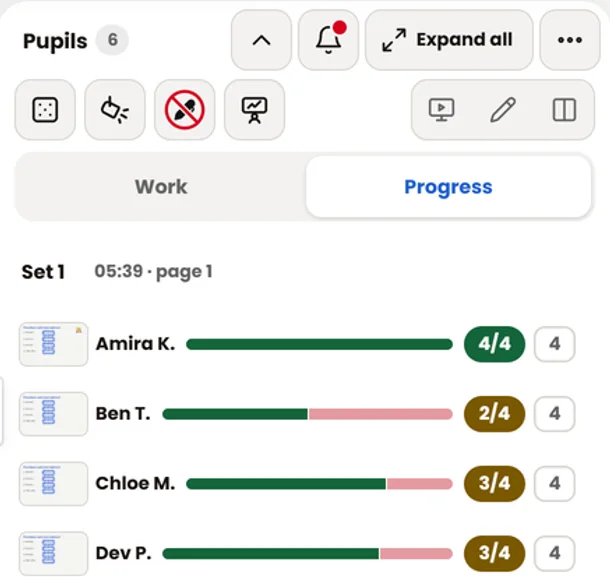
The tick appears as they answer. And you see the whole class at once.
- A live tracker that shows who is right, wrong or not tried yet, question by question.
- Extension questions you can send to early finishers without stopping the class.
- Timed assessments with a mark scheme, released results and per-question analysis.
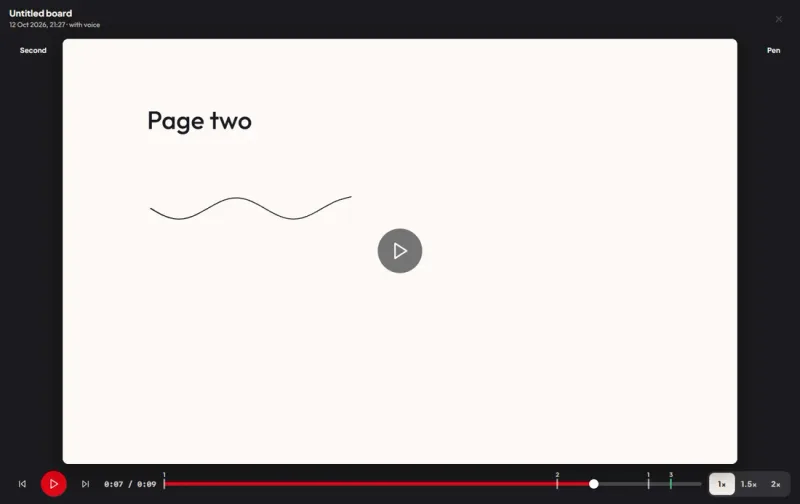
- Records and homework with the lesson’s videos attached, and replays on Groups and Pro.
- Maths tools: bar models, geometry and hands-on manipulatives.
- RobAIn on every paid plan, with nothing reaching pupils until you approve it.
Bring your lessons across as PDFs.
Jotoro has no direct import for Whiteboard.chat. Whiteboard.chat lists “Download Board as PDF”, and Jotoro opens PDFs. Pages come in as pages, and you add answer boxes where you want marking. Start with a few lessons.
- Download a board as a PDF from Whiteboard.chat.
- Import the PDF into your Jotoro Library.
- Add answer boxes where you want marking, and the tick appears as pupils answer.
- Send your class link. Pupils type their name and PIN. Nothing to install.
Their pages say boards are deleted when they expire and cannot be brought back, so download anything you want to keep before then.
Register interest and be first to run one of your own worksheets side by side with what you use now. Every paid plan has a 14-day money-back guarantee.
Questions teachers ask.
Is Jotoro cheaper than Whiteboard.chat?
Not necessarily. Whiteboard.chat has a free plan with limits, and paid plans whose prices we could not read on their own pages on 15 October 2026. Jotoro has a Free plan for one-to-one lessons, then paid plans from £6.99 a month, billed once for 12 months. Check their subscriptions page and compare for yourself.
Do both mark answers automatically?
Yes. Whiteboard.chat lists answer keys, auto-correct and self-check. Jotoro’s answer boxes mark as pupils write, and feed a live tracker that shows you who is right on each question while the lesson is running.
Can my pupils join Jotoro from home?
Yes. Pupils join from anywhere with a class link, a name and a PIN, in a browser. They do not need to be on the same network as you. Whiteboard.chat pupils join with a link and just a name, which is a lighter step.
Does Jotoro have co-teachers, breakout groups or video calls?
Breakout groups, yes: put pupils in pairs, threes or your own groups and watch each group live. Co-teachers and video calls, not at the moment. Whiteboard.chat lists all three. With Jotoro you teach alongside the video tool you already use.
Can I bring my Whiteboard.chat boards into Jotoro?
There is no direct import. Download a board as a PDF from Whiteboard.chat, then import it into your Jotoro Library and add answer boxes. Try it on a few lessons first.
Does Jotoro have a free plan?
Yes. The Free plan is for one-to-one lessons with one pupil, with one board and about 2 hours of live teaching a week. Paid plans start at £6.99 a month, billed once for 12 months, and every paid plan has a 14-day money-back guarantee.
More to read about online whiteboards.
Back to the guide to online whiteboards. Comparing shared boards? Read BitPaper and Whiteboard.fi compared.
A Whiteboard.fi alternative
An honest, dated look at how the two compare.
A BitPaper alternative
A shared paper, or a board for every pupil.
A Jamboard alternative
Jamboard has closed. What to use now, and what suits which job.
Online mini whiteboards
A board for every pupil, and the “show me” habit made digital.
See every pupil think
Every board live, on one screen.
Answers that mark themselves
Ticks as they answer, and a record to keep.
Bring a lesson you already teach, and see it on your own board.
Register interest and we will tell you the day payments open. Pupils are always free, and there is a 14-day money-back guarantee on every paid plan.
Pupils join by link: no app to install, no sign-up for them. See plans and prices.
