A Jamboard alternative for teachers.
If your class used to share a Jamboard, you will have noticed it has gone. Here is a calm guide to what happened, what kinds of tool can take its place, and where Jotoro fits. And where it does not.
Last checked 14 October 2026
- What happened: Google closed Jamboard, and said so in its own announcement.
- How to choose: start with the job you used it for, then pick a tool for that job.
- Where Jotoro fits: a board for every pupil, with you able to see them all.
In short
Google closed Jamboard: no new or edited Jams after 1 October 2024, and the app was wound down on 31 December 2024. If you used it to give each pupil a board in class, Jotoro is an alternative that gives every pupil their own live board and lets you see them all. If you used it for brainstorming with sticky notes, another kind of tool may suit you better.
- Jamboard closed on 31 December 2024 (Google’s own announcement)
- Think about what you used it for, then pick a tool for that job
- Jotoro suits a board per pupil with marking; it is not a sticky-note brainstorming wall
Jamboard has closed. Here is what Google said.
Google announced on 28 September 2023 that it would wind Jamboard down. From 1 October 2024 the app was in “view-only” mode, and on 31 December 2024 Google wound down the Jamboard application. Google said users would no longer be able to reach their Jam files after that and that the files would be permanently deleted. It suggested saving Jams as PDFs.
Published 28 September 2023, checked 14 October 2026. Facts about the closure come from Google’s own announcement, linked above. We have not tested other tools and do not describe them here.
What did you use it for? The answer picks the tool.
Teachers used Jamboard in different ways. Choosing a replacement is easier when you start there.
One shared board for the whole class
Ideas from everyone on one page: a brainstorm, a mind map, sticky notes. Look for a shared-canvas or brainstorming tool.
A board for each child
Every pupil works on their own page while you watch. Look for a tool built around a board per pupil, with a teacher view.
A teaching board for you
You draw, pupils watch. Look for a simple teaching whiteboard or a screen-sharing app.
Some tools are good at more than one of these. Most are best at one.
There are different kinds of tool, and each does a different job.
Shared canvas tools
One big space for a group to add notes and drawings. Good for brainstorms, planning and mind maps. Usually built for work teams first, so check how they handle children and accounts.
Whiteboards inside tools you already use
Some video-call and office apps include a basic whiteboard. Handy if you already use that app. They tend to be general rather than built for a classroom.
Classroom whiteboards, a board per pupil
You see each child’s board and can respond. Good for practising, working through questions and checking understanding in the lesson.
Slides or a document you share
Not a whiteboard, but a familiar way to give every pupil their own page. Simple, and it needs no new tool.
Ask every tool the same three questions: How do pupils join? What happens to their data? Can I see every pupil’s work at once?
A board for every pupil. And you see all of them.
Jotoro is for the second job in the list: a board for each child.
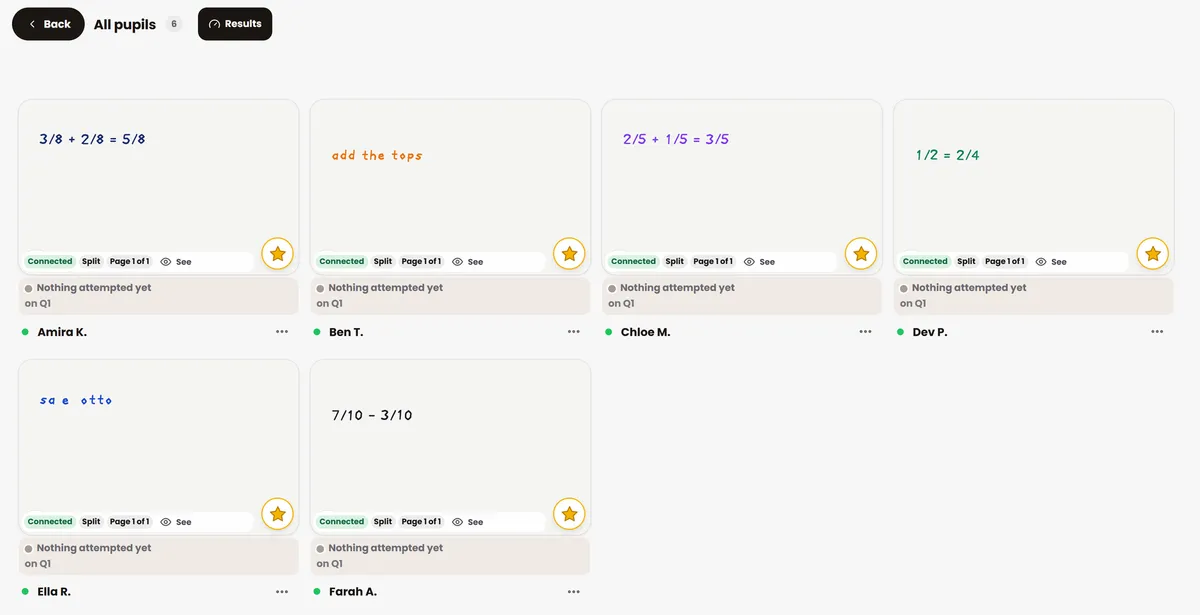
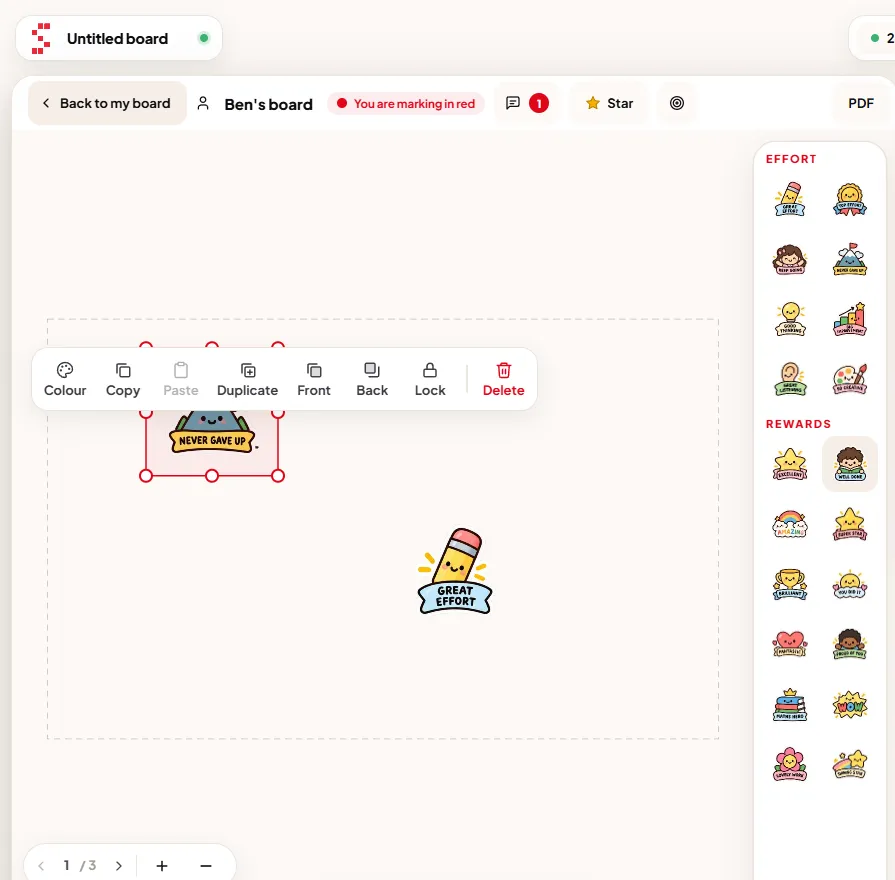
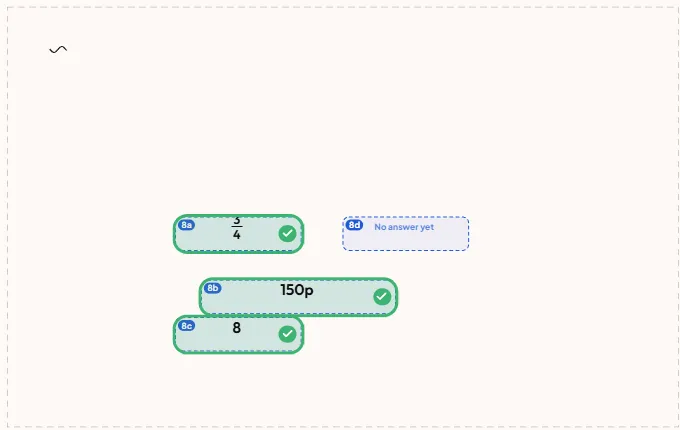
Every pupil writes on their own board, and you see them all on your screen at once. You can step onto any board and mark in red while the pupil watches, and the rest of the class carries on. Answer boxes mark themselves and a question tracker shows who got what. Each lesson leaves a record. Pupils join with a class link and their own name and PIN, with nothing to install, on an iPad, laptop or Chromebook.
Moving your old Jams
Google suggested saving Jams as PDFs. Jotoro can import a PDF (60 or more pages in seconds), and you can write on it, put answer boxes on it and send it to pupils.
Free for one-to-one with one pupil, then Solo, Groups or Pro from £6.99 a month, billed once for 12 months. Pupils never pay. Paid plans have a 14-day money-back guarantee. See plans and prices.
Where Jotoro is not the answer.
Not a sticky-note wall
Jotoro boards are pages, like a book of paper, with one board per pupil. If you want a class to pile ideas onto one shared canvas, a shared-canvas tool will suit you better.
A free plan
Free for one-to-one lessons with one pupil, and a 14-day money-back guarantee on paid plans.
It does not open Jam files
Save your Jams as PDFs and bring those in. Jotoro has no Jamboard import. Any Jams Google has already deleted cannot be recovered by us.
Not made by Google
Jotoro is not part of Google Workspace, and pupils do not sign in with Google accounts.
Five questions to ask any tool.
What did I actually use Jamboard for?
How do pupils join, and do they need accounts?
What happens to pupils’ data, and who owns it?
Can I see every pupil’s work at once, or only one shared page?
What does it cost, and for how long can I try it?
Try it with a real worksheet from your own class before you decide.
Questions teachers ask.
When did Jamboard close?
Google said Jamboard would be in view-only mode from 1 October 2024, with no new or edited Jams, and that it would wind down the app on 31 December 2024. Source: Google Workspace Updates, 28 September 2023.
Can I still get my old Jams?
Google said Jam files would be permanently deleted after the app closed, and suggested saving them as PDFs beforehand. If you saved PDFs, you can bring them into Jotoro. If you did not, check Google’s announcement for the latest on what is possible.
Is Jotoro a like-for-like replacement for Jamboard?
Not exactly. If you used Jamboard for a shared brainstorm, a shared-canvas tool may suit you better. If you used it to give each pupil a board and watch them work, Jotoro is built for that.
Can I use it on a Chromebook or iPad?
Yes. Jotoro runs in the browser on any device, so there is nothing to install.
Is it free?
Yes. The Free plan is for one-to-one lessons with one pupil. Paid plans are Solo £83.88, Groups £119.88 and Pro £179.88 for 12 months, or £11.99, £13.99 and £19.99 a month, and come with a 14-day money-back guarantee. Pupils never pay.
More to read about online whiteboards.
Back to the guide to online whiteboards, or to the Jotoro homepage. Comparing shared boards? Read BitPaper and Whiteboard.fi compared.
A Whiteboard.fi alternative
An honest, dated look at how the two compare.
A BitPaper alternative
A shared paper, or a board for every pupil.
A Whiteboard.chat alternative
Both mark answers. See what else differs.
See every pupil think
An online whiteboard where you see every pupil think.
Try a board for every pupil. Bring a saved Jam in as a PDF.
Register interest and we will tell you the day payments open. Pupils are always free, and there is a 14-day money-back guarantee on every paid plan.
Pupils join by link: no app to install, no sign-up for them. See plans and prices.