

Follow the steps
Mark some pages as extension
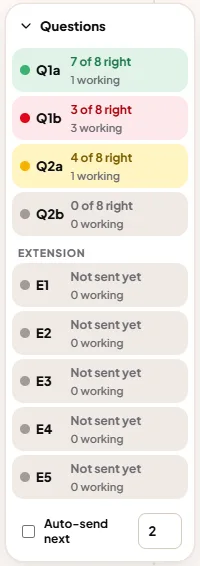
Open the Pages panel, tap ⋯ on a page, then tap Mark as extension. Do this for the harder pages. You can also add them from your Library. They show up in the Questions strip under Extension as E1, E2 and so on.
Leave them hidden
Extension pages stay hidden from the class. Nobody sees them until you send them, so pupils who are still on question 3 are not worried by what comes next.
Spot who has finished
When a pupil has done the worksheet, a finished badge appears on their thumbnail in the Pupils panel. That is your cue: Ella is ready for more.
Send the next questions
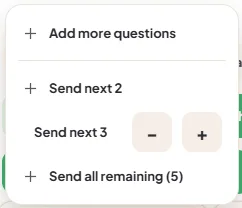
Tap the Finished badge. Choose Send next 2 to give two extension questions, or Send all remaining to give the lot. Use the plus and minus to send a different number.
Watch the thumbnail
The pupil’s thumbnail now reads something like Ext 2/5: two of five sent. Jotoro remembers who has had which, so when Chloe finishes next you will not send her the same two twice.
Or let Jotoro do it
Tick Auto-send next at the bottom of the Questions strip and choose how many. Each pupil who finishes then gets the next questions without you tapping. You can also send to everyone who has finished in one go.
Good to know
- Keep extension questions a step harder, not a different topic. Pupils who finish early should feel stretched, not parked.
- Send two at a time. A pupil who finishes those can be sent two more, and you stay in control of the pace.
- Extension questions have answer boxes too, so the tracker shows how they are going.
- Assessment sittings never get extension sends, so a timed test stays fair for everyone.
Common questions
Can pupils see the extension pages before I send them?
No. They stay hidden from the class until you send them.
Will I send the same questions twice by mistake?
No. Jotoro remembers which extension questions each pupil has had, and the thumbnail shows it, for example Ext 2/5.
Can I send extension questions during a test?
No. Assessment sittings never get extension sends.
Do I have to send them one pupil at a time?
No. You can send to every pupil who has finished, or tick Auto-send next and let Jotoro do it.
Related guides
 How to add answer boxes and mark a worksheetMarking & answer boxes
 How to use the live question trackerMarking & answer boxes
 How to turn a multiple-choice PDF into tappable questionsMarking & answer boxes
 How to get started with JotoroGetting started
Cannot find an answer?
Tell us what was missing and we will improve this guide.
Suggest an improvement