

Follow the steps
Pick a tool
Tap Maths, then Geometry, and choose the Ruler, a Set square, the Protractor (half circle or Full circle) or the Compass. Or type its name into Quick find: even protracter with a typo finds it.
Let it snap to your line
Drag the tool towards a line or a corner and it snaps into place, so a measurement starts exactly where you mean it to.
Read the angle as you move
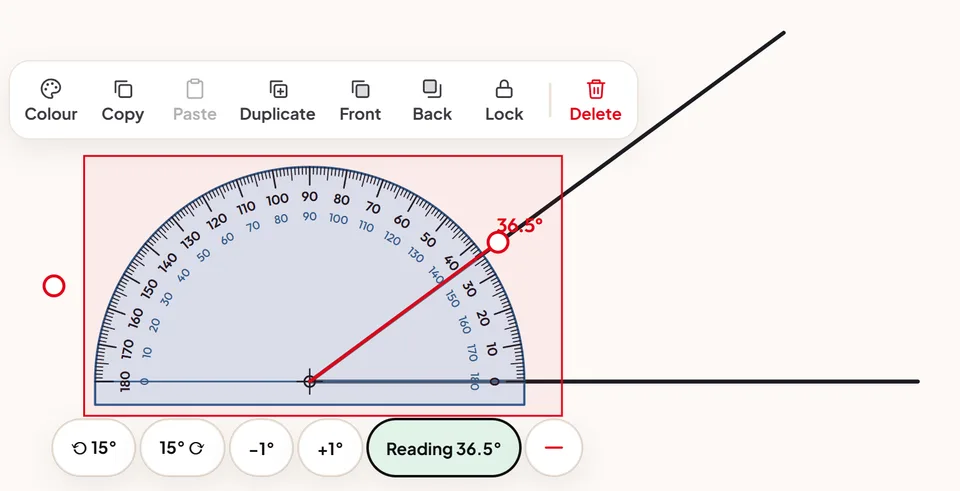
Turn the protractor and nudge it by 15° either way, or by 1° at a time, until it sits just right. Tap Reading arm, then drag the arm: the reading changes live as it moves, so pupils watch the number change.
Measure a line or an angle
Pick the Measure line or Measure angle tile, then tap a line, or two lines that meet, to see the length or the angle. Use it to check pupils’ drawings against the real size, not only to draw new ones.
Draw an arc with the compass
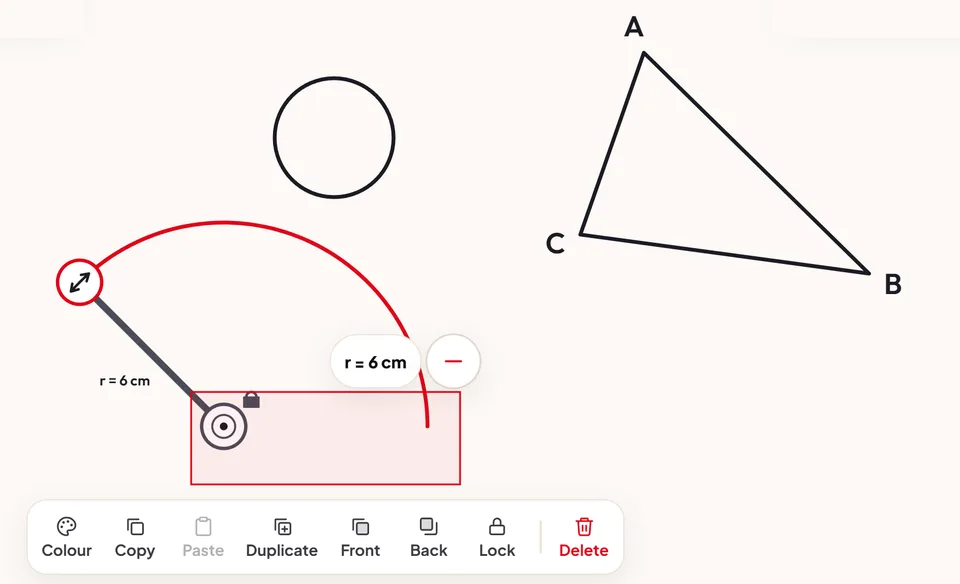
Drag the middle ring to open or close the compass to the radius you want, and the board shows it, for example r = 6 cm. Drag the point to carry it, then drag the pencil round to draw: you get a real arc, not a freehand wobble. Full circle draws the whole circle round the pin.
Tidy a shape with your pen
Draw a rough circle or a polygon, then hold the pen still at the end of the stroke and it tidies into a perfect shape.
Good to know
- Teach the habit of lining the zero up first. The protractor shows both scales, so ask pupils which one they should read.
- Ask “is that angle acute or obtuse?” before you read the number. It catches the common mistake of reading the wrong scale.
- Draw a shape with the compass and ruler, then ask pupils what they notice about it. Shapes like these make good graph and coordinate starters too.
- Check pupils’ own work on their boards while the lesson runs, and mark it right on the page.
Common questions
Do I need a real protractor and compass in the room?
No. They are on the board, and you can teach angle and construction work without a set of physical equipment.
Is the protractor accurate?
The reading follows the reading arm as you move it, and you can nudge it by a single degree to line it up exactly.
How do I set the compass radius?
There is no pin to tap. Drag the middle ring to set the radius, drag the point to place it and drag the pencil round to draw. What the compass draws is locked, so nobody moves it by accident.
Related guides
 How to use maths manipulativesTeaching tools: Maths
 How to draw a bar modelTeaching tools: MathsHow to draw a maths graphTeaching tools: Maths
 How to get started with JotoroGetting started
Cannot find an answer?
Tell us what was missing and we will improve this guide.
Suggest an improvement