Why do you keep explaining the same thing?
Tuesday, quarter past four. Amira’s hand goes up. “I forgot how you do the bar thing.” You explain it. Twenty minutes later Ben says the same. On Thursday, a different group, the same question comes round again.
Every teacher knows this loop. Some methods need explaining five times a week, and each time you explain them a little differently, a little more tired. A recording does not replace you. It takes the repeat off you, so that the second, third and fourth explanation can be done by a clip while you spend your attention on the child who needs a person.
What makes a good support video?
Not a lecture. A good support video does one thing.
- One method. “Adding fractions with different denominators”, not “fractions”.
- Your real explanation. The one you gave when the class did not get it the first time, usually better than the one you planned.
- Short enough to rewatch. If a child has to sit through the introduction again to reach the useful part, they will not.
- Written as well as spoken. Seeing the pen move while you talk is what makes a replay useful: the child watches the working appear in the order you thought it.
Hana, stuck on question five, does not want your whole lesson. She wants the thirty seconds where you showed her how to line up the digits.
How do you record without making it a production?
You do not need a microphone on a stand or a second take. Press record when you are about to explain the tricky part in the live lesson, explain it as you would anyway, and stop.
Recording a support video in five steps
- Choose the moment. The best clip is usually the explanation that follows a “wait, I don’t get it”.
- Say the question out loud first. “Today’s question is how to share the bill into equal parts.” It helps whoever watches it later.
- Go slowly where it is hard. Not everywhere.
- Stop when the point is made. Resist adding the next topic.
- Look again afterwards. If a part wanders, trim it.
Do this a few times and you build a small stock of explanations that sound like you, because they are you.
Where do the recordings go?
A clip nobody can find is a clip nobody watches. The most useful place for a support video is right beside the work that needed it.
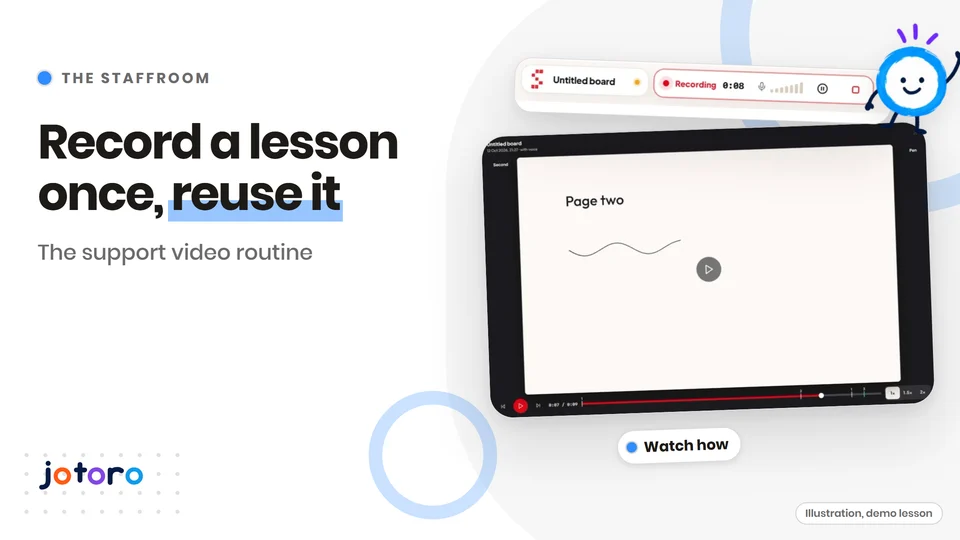
Jotoro lets you explain something properly once. One Record button captures the board and your voice as you teach. The replay is redrawn rather than filmed, so the writing stays sharp on any screen, and it is saved inside the lesson it came from, so you do not have to go hunting for it afterwards. You can use the whole replay or a trimmed part of it as a support video: pupils get a “Watch how” button, so a child who forgot the method can watch it again on their own device, as many times as they need, without putting a hand up.
If you ever want a copy outside Jotoro, for a parent or for a class that is not on Jotoro, you can download it as an MP4.
What about homework?
Homework is where the “Watch how” button earns its place. A child sitting with a worksheet and no teacher is exactly the child who needs the explanation again. When you set homework in Jotoro you can attach the replays from the lessons it came from.
Pupils can open homework in Jotoro from home as well as in your classroom or school, and they can press Watch how wherever they are.
How do you build a library of explanations?
Slowly, and without a special project. Each week, notice the one question you were asked more than once, and record the explanation the next time you give it. By the end of a term you have a dozen clips that answer the questions your own pupils actually ask, in your own voice.
Save them with the lesson they belong to, and put your best worksheets and boards in your library so the clip and the page travel together. Next year’s group gets them from day one, and a new tutor in a tuition centre can see how the centre explains long division instead of guessing.
Is it fine to record children?
Be careful here, and be clear with families. A recording of your board and your voice is straightforward. A child’s voice is different: it needs the family’s consent, and it is kind to ask the child too. In Jotoro, a child’s voice only goes into a recording when consent is on file and the child says yes at the time. If in doubt, record just your own voice and writing. Most support videos work perfectly well that way.
What should you do tomorrow?
Pick one method you are tired of explaining. Next time it comes up, record it. Watch it back once, trim it if needed, and attach it to the page where children get stuck. Then notice, in a week, how many fewer hands go up for that question.
You can register interest to try this, and plans and prices are there when you want them. There is a 14-day money-back guarantee. For how recorded explanations fit into one-to-one lessons and groups, have a look at those guides. You can also read about creating lessons and the live classroom.